Auditrack Copy 3@1x Created with Sketch.

DocBridge® Auditrack

Supervision of Your Entire Document Production Process – at Your Fingertips

Use
Benefits
At a Glance
Why DocBridge?
Use
  • Close to Real-time Information or Long Term Analysis
    The entire process from pre-press preparation through finishing can be made available to you in a single dashboard. Ad hoc queries, scheduled reporting, or threshold-based alerts give you all the information you need to run your operation right.
  • Personalization
    Each department or end-user can define their own views, queries, reports, or widgets to control exactly what they need to see from the whole process.
  • Event Driven Data Capture
    Automated consolidation of communication events from multiple production sites and different systems through the ability to apply unique document identifiers along the whole life cycle process.
  • New Channels? No Problem.
    Thanks to a sophisticated architecture, DocBridge® Auditrack allows the reception of process information from ERP systems, information provided through the APIs of printers and finishing equipment, or responses from mail-servers and archives.
  • Adapt Data to Your Information Needs
    Utilize powerful search and filtering on every document object and apply business rules such as adding criteria to search and filter documents or events per document type, business line, or customer category.
  • Auditing and Tracking in Multi-Channel Environments
    Comprehensive auditing of all communication processes, systems and events independently of output channels.
Benefits
  • 360° View of Your Operations
    A view on document production detailing the full life cycle of document processes allows you to optimize your operations more effectively.
  • Central Data Concentration
    Ability to tab into any information source along the production line brings all data to a central point and makes access to information more efficient.
  • User-specific Dashboards
    Enabling end users with different roles and needs to create their own specific views allows them to better utilize all available information.
  • High-flexibility in Queries, Reports and Widgets
    Light-weight system prevents prohibitive cost for flexible adaptations.
  • To the Point Information Generation
    Better and more detailed information increases predictability and therefore improves production planning.
  • Enhanced Audit in Communications
    Full trace of the path of each document through the whole creation process make the audit trail more reliable.
At a Glance

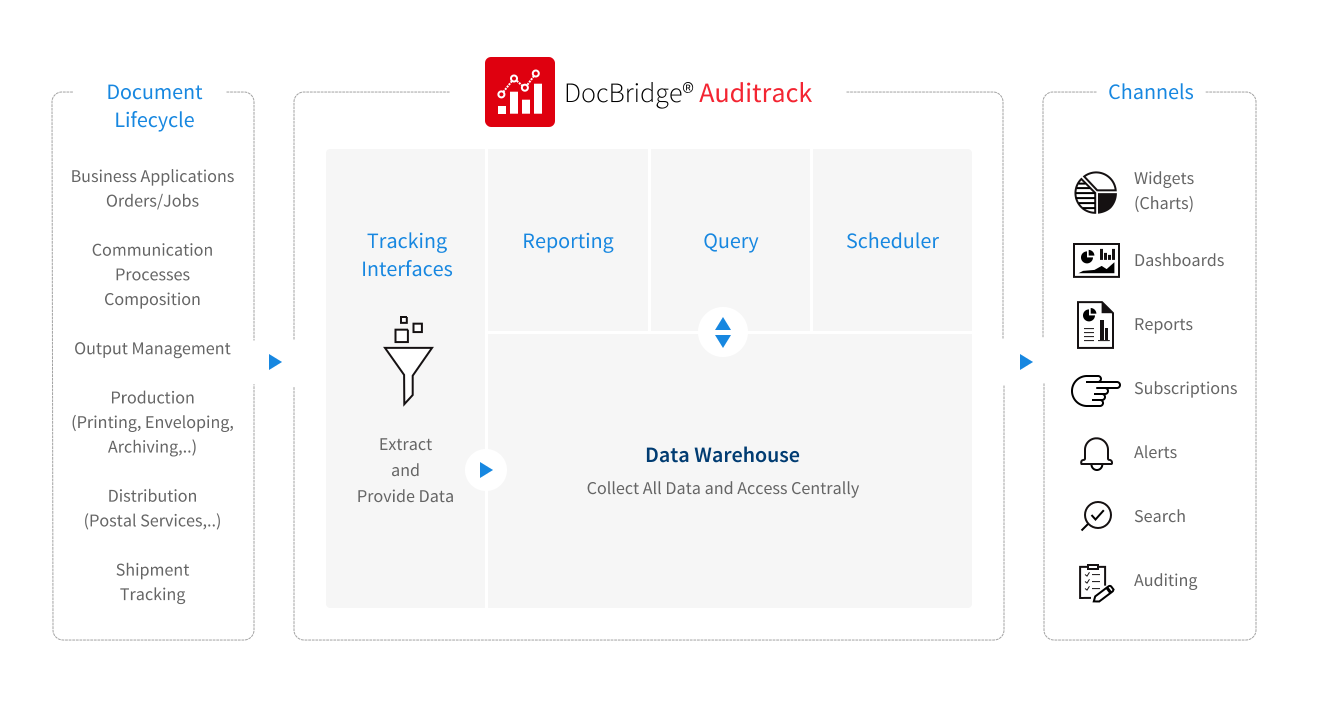
Take a look at the graph beneath illustrating the supervision
of all document data along the entire lifecyle and various channels

Why DocBridge?

DocBridge® provides high-performance, platform-independent and scalable software solutions for Omnichannel Customer Communications and document management.

  • Experts for Omnichannel Document and Output Management
  • Bridge between the analog and digital document world
  • Digital first: state of the art document generation focused on electronic communication
  • Proven expertise in quality assurance, document conversion and mail bundling/postage optimization
  • Wealth of technology and consulting know-how for batch and individual processing

Headquartered in Germany, the company has been a market presence for 30 years, with subsidiaries and a network of partners in Europe, Africa, and North and Latin America.

Compart helps businesses create, produce and distribute documents using applications for compliant and efficient processing of large volumes of data in batch as well as transaction processes.

The DocBridge® product family that Compart develops, sells and supports covers the document and output management process from start to finish: creation, preparation, and output of information on every physical and electronic channel.

The company enjoys a reputation as a trendsetter worldwide. More than 1,500+ customers from a wide range of industries in over 50 countries (including banks, insurance companies, energy suppliers, telecommunications companies, print service providers, public administrations, logistics, and healthcare) use Compart applications.

Collect all Document Data and Access Centrally Along Various Channels

DocBridge® Auditrack is a product of the DocBridge® Production Suite

Request a Demo
x
icon
Schedule a demo with a Compart product expert

Visibility and Transparency in Document Production Management

DocBridge® Auditrack's primary goal is to store document production metrics from distributed sources along the whole production line into a central repository, to be able to generate reports, charts or dashboards.

That provides for keeping track of the document itself as well as of all the relevant events throughout the communication process.

DocBridge® Auditrack can thus be utilized for  production monitoring and job planning or for audit inquiries.

DocBridge® Auditrack can restore the visibility lost on the execution of document processes through real production events that are recorded progressively in the centralized repository.

Watch the Video

DocBridge® Auditrack: Comprehensive Auditing of Communication Processes

Learn how DocBridge® Auditrack provides enterprises and users of multichannel-infrastructures the transparency required for tracing and monitoring communication processes in real time. Get inspired in the video now.

The Software: Main Features and Concept

Cross-System Evaluation
Search and Analysis
Automated Reports
Widgets and Dashboards
Intelligent Alerts
Role and Rights Management
Cross-System Evaluation

Cross-system evaluation of all communication events

DocBridge® Auditrack collects and consolidates all events that arise along the document production line: from input files, processing steps, events, print jobs, and shipping channels, to output files. The software provides these events in a structured way and allows for both simple and complex queries to transparently map production chains. This enables complete traceability of all communication and manufacturing processes down to the document or shipment level.

KPI Monitoring für Dokumente - Dokumentenmanagement
What advantage does the cross-system evaluation of all document production events offer?
  • It makes distributed log and process data evaluable.
  • It creates end-to-end transparency across the entire production line.
  • It enables consistent analyses without data breaks.
  • It facilitates audits, error analyses, and regulatory evidence.
Search and Analysis

Flexible search and analysis functions

With the simple search, typical questions such as tracking a batch, a shipment, or a document can be mapped. Filters, criteria, and aggregations can be defined via the GUI.
The advanced search is available for more demanding analyses. It allows queries in SQL, JavaScript, or Groovy, so that data can be freely modeled, transformed, and output in tabular or JSON format. Complex calculations such as SLA analyses, production statistics, or time-based evaluations can also be flexibly implemented with it.

What search and analysis functions are available in document production?
  • Standard searches (shipment, batch, document) via GUI.
  • Filters, criteria, and aggregations can be defined without programming.
  • Advanced queries (SQL, JavaScript, Groovy) enable in-depth analyses.
  • SLA checks, time comparisons, or production statistics can be implemented individually.


Automated Reports

What automated reportings are available for document production?

DocBridge® Auditrack makes it possible to prepare any queries as reports – for example, in PDF, HTML, XLS, or CSV. These reports can be viewed directly, saved, versioned, or generated automatically on a regular basis. Schedules can be freely designed using Cron definitions, so that periodic reports (daily, weekly, monthly, or individually triggered) can be automatically distributed to defined recipients.

Auditing - Analyse der Dokumente bzgl. Prozess, Workflow und Performance
Widgets and Dashboards

Widgets and Dashboards for Real-Time Visualization

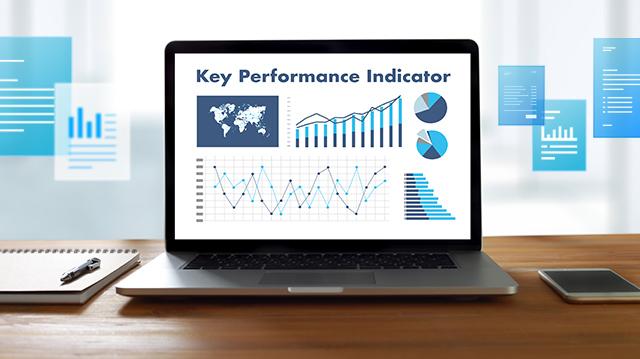
For a quick understanding of the production situation, DocBridge Auditrack offers a variety of graphical analyses. Results of queries are displayed as widgets (e.g., bar charts, timelines, histograms, donuts, gauges). These widgets can be flexibly combined, grouped, and integrated into dashboards.
This creates a clear visual control center that shows current production figures, workloads, error indicators, or channel distributions in real time. Decision-makers and specialist departments can make data-driven decisions without having to sift through raw data.

Monitoring in der Dokumentenproduktion - automatisiert Dokumente überwachen
How do widgets and dashboards help with real-time visualization of the document production?
  • They translate complex data into understandable graphical elements.
  • They show workloads, errors, and process statuses in real time.
  • They support specialist departments and decision-makers with clear action signals.
  • They enable individual dashboards as a central control view.

     
Intelligent Alerts

Intelligent Alerts and Proactive Monitoring

A central element of DocBridge® Auditrack is the ability to configure alerts based on defined key figures or query results. If a threshold is exceeded – such as a delay, a failure, an SLA violation, or an unusually high error rate – the system automatically triggers a notification.
Alerts can be delivered via the portal or email and can be flexibly scheduled or subscribed to. This creates a proactive monitoring system that detects problems before they have noticeable effects on production.

Why are intelligent alerts and proactive monitoring essential in document production?
  • Problems are detected before they impact production.
  • Thresholds and rules automate the monitoring of critical processes.
  • Notifications via portal or email immediately reach the relevant people.
  • SLA violations, failures, or error rates become visible early on.


Role and Rights Management

Role and Rights Management for Maximum Security

The software offers comprehensive user, role, and group management. Administrators can precisely control who is allowed to view, edit, or share which searches, reports, alerts, or dashboards. Access control to events, data sources, and system functions can also be regulated granularly.
These governance mechanisms ensure that sensitive production and customer data remain protected at all times and that only authorized persons can access the respective content.

How does the rights and role management work?
  • Through a clear assignment of users to roles and groups with defined permissions.
  • Through granularly controllable access rights to searches, reports, dashboards, event data, and system functions.
  • Through differentiated release mechanisms that ensure only authorized persons can view or modify sensitive content.
  • Through integrated governance functions that ensure compliance, auditability, and data security.

Do you have questions?
We can help

Application Scenarios

1 360-Degree Monitoring of Production
2 Cost Control through Evaluation of the Right Key Figures
3 Alert System for Exceeding Predefined Thresholds for Indicators
1 360-Degree Monitoring of Production
Goal

To create a fully transparent production chain in which every file, every processing step, and every output is traceable at any time.

Challenge

Existing query and reporting systems are often too inflexible to map complex process chains. Data is scattered across different systems and log sources, and important information from upstream or downstream process steps is often missing, meaning no complete overall picture is created.

Solution

DocBridge Auditrack consolidates all events centrally, connects process steps contextually, and enables real-time transparency and complete traceability down to the document and shipment level.


2 Cost Control through Evaluation of the Right Key Figures
Goal

To precisely identify, control, and optimize costs in document production – from production volume to process inefficiencies.

Challenge

Without uniform key figures and meaningful analyses, cost drivers remain invisible, and strategic decisions are too often based on estimates rather than facts.

Solution

With flexible queries, individual KPIs, and meaningful production statistics, Auditrack clearly shows where costs arise and which measures lead to efficiency and savings.

3 Alert System for Exceeding Predefined Thresholds for Indicators
Goal

To detect disruptions, SLA violations, or rising error rates early and be able to react immediately, before they impair production.

Challenge

Manual monitoring is error-prone and far too slow to identify critical deviations in time.

Solution

Auditrack automatically monitors defined indicators, triggers alerts when threshold values are exceeded, and informs responsible persons via the portal or email for immediate action.

Get the Answers
and Solutions You Need