Automated PDF/UA Tagging - e.g. for Documents in the Archive:
Learn how to automatically tag existing PDFs and convert them into 100% legally compliant PDF/UA files.
Valid PDF/UA Document Creation
Automated, Secure, Scalable
Generate accessible PDF straight away during creation
With DocBridge® Communication Suite, you can generate accessible PDFs directly during document creation. It enables you to create documents for print, web, and mobile within a single application and distribute them across all relevant channels – whether as a printed page, a PDF email attachment, or a responsive HTML page. Each document is created centrally only once, regardless of the output medium, and is automatically accessible according to PDF/UA.
Tagging Existing Standardized Documents
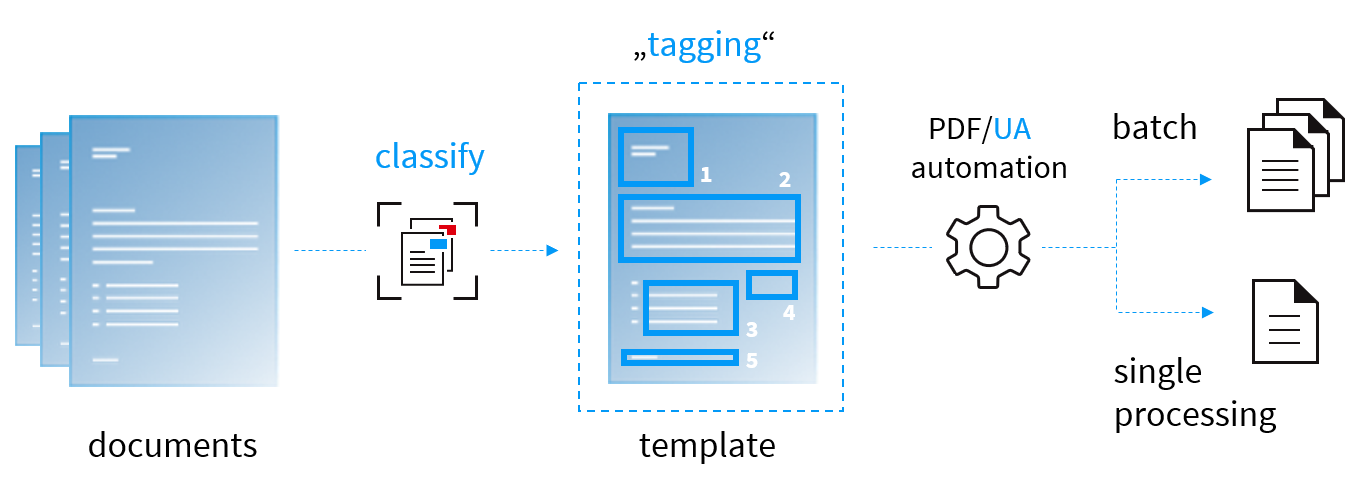
In addition, the Compart solution with the Accessibility Designer offers a workflow for the automatic tagging of existing documents – for example PDF or AFP to PDF/UA. These are often documents generated by leading document creation or ERP systems. Their standardized structure and similar layout enable particularly efficient processing and automation.
By classifying documents by type, they can be processed efficiently using shared rule sets (templates). The templates contain semantic tags that reflect the structure of the document. All relevant content, such as headings, tables, or images, is correctly tagged. Through an automated workflow, the template can be applied to any number of documents of the same type.
Tagging Existing Unstructured Documents
For unstructured or highly variable documents, Compart provides a dynamic approach. A script-based process analyzes each document individually based on layout and corporate design specifications and generates a tailored rule set for tag structuring – fully automated and without limitations regarding document type, layout, or complexity.
Why Comparts PDF/UA Software?

Efficiency
Efficiency
Fast and automated processing of large document batches

Compliance
Compliance
Easily create accessible documents as PDF/UA and WCAG compliant

Integration & Flexibilität
Integration & Flexibility
Seamless integration into existing systems thanks to open standards and a modern cloud-native architecture

High Scalability
High scalability
Perfect for companies with high document volumes