icon-docbridge-delta@1x Created with Sketch.

DocBridge® Delta

Automated document comparison that catches every discrepancy – before it reaches production

Request a demo

Use
At a Glance
Why DocBridge?
Use

Document quality you don't leave to chance

Automated document comparison for AFP, PDF, PCL, and more
– scalable, cross-format, CI/CD-ready


  • No discrepancy goes undetected
    You catch layout errors, text deviations, and formatting differences before your customer does – pixel-accurate, even with high-volume print data and nested, variable content. Costly reprints and reputational damage are a thing of the past.
  • One tool for every test scenario
    From direct document comparison to regression and iteration tests to rule-based validation against stored criteria – DocBridge® Delta covers all verification scenarios that arise in output management and CCM. No parallel tools, no media breaks.
  • Your team no longer checks manually
    Automated document comparison replaces time-consuming spot checks and error-prone visual reviews. Your staff focuses on core business – quality assurance runs reliably in the background, even with large document volumes.
  • The same quality for every format
    AFP, PDF, PCL, PostScript – DocBridge® Delta ensures the same testing standard regardless of format, structure, or source. Cross-format comparisons are also supported. No document falls through the cracks, regardless of which system it comes from.
  • Each user group gets its own report
    Developers receive the detailed object-level log file, business users get the visual PDF report, and management gets the summary. No manual preparation, no information loss between teams – all stakeholders see exactly what they need.
  • Clear roles, secure processes
    Clearly defined user roles and permission concepts ensure that only authorized individuals can change configurations or release results. Compliance requirements and internal control processes are met without additional effort.
At a Glance
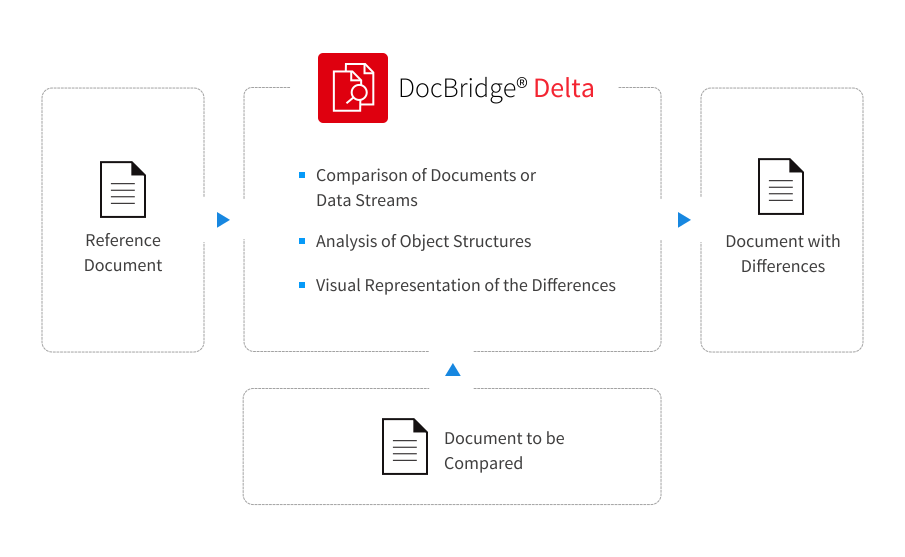
Compare documents or data streams and visualize differences according to predefined rules. Automated document checking (document analysis) with DocBridge® Delta.
Why DocBridge?

DocBridge® provides high-performance, platform-independent and scalable software solutions for Omnichannel Customer Communications and document management.

  • Experts for Omnichannel Document and Output Management
  • Bridge between the analog and digital document world
  • Digital first: state of the art document generation focused on electronic communication
  • Proven expertise in quality assurance, document conversion and mail bundling/postage optimization
  • Wealth of technology and consulting know-how for batch and individual processing

Headquartered in Germany, the company has been a market presence for 30 years, with subsidiaries and a network of partners in Europe, Africa, and North and Latin America.

Compart helps businesses create, produce and distribute documents using applications for compliant and efficient processing of large volumes of data in batch as well as transaction processes.

The DocBridge® product family that Compart develops, sells and supports covers the document and output management process from start to finish: creation, preparation, and output of information on every physical and electronic channel.

The company enjoys a reputation as a trendsetter worldwide. More than 1,500+ customers from a wide range of industries in over 50 countries (including banks, insurance companies, energy suppliers, telecommunications companies, print service providers, public administrations, logistics, and healthcare) use Compart applications.

90%
time savings

in regression tests
and document comparisons
(Centris AG)

Nearly 100 %
document quality

Accuracy and rule compliance – even for highly variable documents.
(Allied Printing)

11.5 billion
mailings/year

Proven in production environments with extremely high document volumes.
(Data-Mail)


Latest Release:
DocBridge® Delta 4 – The Next Generation of Document Verification

DocBridge® Delta 4 combines the proven precision, reliability, and production readiness of previous versions with a scalable, web-based platform architecture. Operation, usage, and integration are simplified – with full enterprise functionality and a focus on scalable quality processes in CCM and output management.

Modern, Standalone Platform

DocBridge® Delta 4 is a web-based application with cloud- and container-ready architecture that enables teams to compare and analyze documents directly in the browser – without local installation. Comparison profiles can be configured centrally via the web interface. Reference and candidate files are selected directly through the interface. Result: simplified operation, faster onboarding, and central availability of verification processes.

Enterprise Integration & Security

OpenID Connect (SSO) and license server support enable secure, scalable integration into existing enterprise infrastructures. Multi-database capability supports flexible operating and scaling models in complex IT landscapes.

Production-Ready Performance & Automation

DocBridge® Delta 4 supports high-volume processing, batch execution, REST APIs, and CI/CD integration, making it suitable for fully automated production and QA processes.

Secure Upgrade Path

Existing test configurations remain compatible, so existing processes and investments can continue to be used. The transition involves minimal migration effort.

Future-Proof Your QA Processes

DocBridge® Delta 4 is designed as a long-term QA platform. Compart is building all future quality assurance features on this foundation – your current configurations remain compatible, your processes stable.


Request a Demo
x
icon
Schedule a demo with a Compart product expert

Automated Document Verification for 100% Quality Assurance

DocBridge® Delta is a productivity-enhancing QA testing software that analyzes and compares electronic documents and verifies compliance.

Test results are presented both visually and in the form of detailed reports. The software is designed for a high level of utilization and supports the requirements of both the development team and professional users.

DocBridge® Delta checks for both intentional and accidental changes, and even points out instances in the document that are not visually discernible, but could lead to production difficulties.

The software compares documents of the same format and in different formats.

The software offers two different test models: an interactive interface for ad-hoc tests and the command line-driven call for automation.

DocBridge® Delta takes into account different tasks and roles involved in the quality assurance process. This allows different output results to be assigned to specific functional areas according to their specific needs.


DocBridge® Delta in Aktion

Webinar on demand: New platform, real-world use cases, technical insights

In this on-demand webinar, we show you what DocBridge® Delta means in concrete terms – for your operations, your integration, and your quality processes.

You will see how the new web-based interface works, how comparison profiles are configured, and how DocBridge Delta is integrated as an automated quality gate in CI/CD pipelines. Supplemented by a technical overview of the architecture.

Our Software: Main Functions and Concept

Functionality
Architecture and Components
User
Functionality

What can DocBridge® Delta do?

  • Comparison of documents
    of the same or different format - especially suitable for large production jobs and data streams
  • Visual representation
    of the differences down to pixel size
  • Detailed list
    of differences at the object level
  • Evaluate return codes
    for automated program sequences
  • If the entire page content is positioned differently,
    a shift can be specified for the document to be compared.
  • Pages of the documents to be compared
    can be individually suppressed to make comparisons, for example, even with inserted blank pages.
  • Page ranges with changing content
    such as address fields or dates can be excluded from the comparison.
  • Check for meta-information
    such as indices in TLEs of AFP documents.
Architecture and Components

DocBridge® Delta offers three Basic Test Methods

  • An interactive interface for ad-hoc testing
  • A command line driven call for automation
  • Web Services

The solution developed by Compart finds and analyzes differences between individual documents electronically and visualizes them as well. In the process, the objects coded in the files are examined down to every detail structure and the differences are displayed - both visually and lyrically. Certain areas can be masked so as to be excluded from the comparison, for example the variable address field.

Visual Document Comparison

In the visual comparison, both documents are rasterized into a pixel image of the same resolution and the converted pixel images are compared with each other - similar to a light table, in which both documents are superposed to recognize differences between them. In the generated file, the pixels matching in both documents are displayed in gray. If, on the other hand, individual pixels only appear in one of the two documents, the pixels present only in the reference document are displayed in green and the corresponding pixels in the document to be matched are displayed in red.

In this way even the smallest differences of objects, such as e.g. margins that differ only by one pixel width, with slightly differently cut characters of a font, instantly recognizable.

If the document to be compared shows that the entire content has been moved, an additional setting can be used to compensate for the offset, in order to be able to check whether there are other differences between the documents besides the shift.

If there are individual pages in the documents to be compared which are not available in the comparison document, they can be suppressed during the comparison, for example, to exclude any additional blank pages from the comparison.

The difference document with the color-separated comparison points is output as a multi-page TIFF document or as a standard PDF.

Structural Comparison at the Object Level

DocBridge® Delta writes the detected differences of the individual objects on each page in detail into a log file. From the entries in the log file, differences can be found e.g. take the following way:

  • Different positioning of objects
  • Content differences of objects such as text differences or different barcode content
  • Different attributes of the same object types, e.g. different fonts or font attributes like font sizes for the same content of the text

Before the check, the documents to be compared are converted to the Unicode-based metaformat so that only real text differences are registered even when using a different code page.

More Comparison Options

In addition to the comparisons in the representations of objects between two documents, DocBridge Delta also offers checks of the following type:

  • Binary comparison between two document files
  • Check for size differences with the optional specification of a minimum value in bits or pixels (only size differences above a certain value are taken into account)
  • Comparison of page number and layout
  • Comparison based on positioning tolerances (only positioning differences above a certain value are taken into account)
  • Excluding definable page ranges for comparison with changing contents such as e.g. Address fields or dates
  • Differences in meta-information such as e.g. different indexes within TLEs in AFP documents or XMP information in PDF documents
User

Document Designer

uses DocBridge® Delta to adapt, check and authorize the text and layout of templates (adding, changing and removing text modules) in the event of changed terms and conditions, new products and the like.

Clerk

checks the extent to which changes to the document-generating software affect content, layout and rule compliance (regression/iteration tests).

Print Center Production Manager

uses DocBridge® Delta (Analysis) to determine the data important for high-speed printing (expected ink consumption, page number/size, embedded fonts, images, simplex/duplex printing, CMYK color coverage).

Do you have questions?
We can help

References

1 Centris: Document Validation in Healthcare
2 Data-Mail
3 Customer Success Story
4 Regression Testing
1 Centris: Document Validation in Healthcare
Document Validation in Healthcare: 90% Faster – and Reliably Fact-Based

Centris AG, specialized in industry solutions for Swiss health and accident insurers, faced a dual challenge: the simultaneous introduction of a new output management system and extensive layout changes on the customer side had to be fully verified for end-customer-relevant documents – with up to 60,000 pages per test run.

With DocBridge® Delta, pixel- and text-based comparison tests were fully automated. The result: the comparison process accelerated by 90%, test evaluations deliver fact-based confidence rather than gut feeling – and the intuitive interface ensured rapid team adoption.

"Quality assurance has reached a new dimension with DocBridge® Delta."

Patrice Witschi Centris AG
Patrice Witschi
Centris AG

More

2 Data-Mail
Document Verification and Quality Assurance

Chose DocBridge® Delta in its search for a powerful tool for checking complex documents with variable data. Immediately after the introduction, the employees noticed a significantly higher processing speed in around 80 percent of the checks.

„We have the assurance that all documents to be sent are absolutely correct. Our customers have become so convinced of our high quality that some of them have publicly defined Data Mail as their quality standard."


Chris Bennett Data-Mail
Chris Bennett
Data-Mail

More

3 Customer Success Story
Automated Document Comparison Established

Our customer - a leading provider for business process outsourcing - has been working with the DocBridge® Delta document comparison software since 2012 - and is thus able to compare documents visually as well as on the text level. Even the smallest differences can be detected, even with complex and extensive documents.

Our Customer says:

„Today, document verification is not only more secure, but also more efficient; after all, thanks to automation, employees can concentrate better on their core business."

4 Regression Testing
Regression Testing

Both custom applications and marketable composition software allow you to check all changes and upgrades against legacy applications.

Iteration Testing

Creating a document requires several programming steps and subsequent tests. Changes to existing documents also require a detailed testing process.

Conversion Tests

In business, documents and print files often need to be modified or converted to other formats for production or shipping. Comparison of the original document with the output file guarantees completeness and correctness.


Frequently Asked Questions About Document Validation and Document Comparison

What is document comparison software?

Document comparison software automatically analyzes two or more electronic documents and identifies differences – both visible and non-visible changes such as layout shifts, text modifications, or metadata differences. DocBridge® Delta helps organizations validate documents reliably and efficiently while meeting quality requirements.

What is document verification (Document QA)?

Document verification is an automated quality assurance process in which documents are checked against defined rules, layout specifications, or reference documents. The goal is to detect errors early and ensure compliance with requirements. Particularly in regulated industries, document verification helps minimize risks and meet compliance requirements.

Which document formats can be compared?

DocBridge® Delta supports a wide range of document formats, including AFP, PDF, PCL, and PostScript. In addition, documents of different formats can be compared with each other – not just format against format, but also cross-format. A complete format overview is available in the customer area.

How are dynamic content elements handled during comparison?

Dynamic content such as timestamps, transaction numbers, or personalized fields can be specifically excluded from the comparison. To do this, mask areas or comparison rules are defined that ignore this content. This ensures that only relevant differences are detected, false alarms for personalized documents are reduced, and the accuracy of the comparison is significantly improved.

What differences can a document comparison detect?

DocBridge® Delta detects both visible and hidden differences: layout shifts, text changes, font changes, deviating page numbers, metadata differences, and size deviations within defined thresholds. Dynamic content such as timestamps can also be specifically hidden to clearly separate relevant deviations from expected changes.

How can document comparison be integrated into IT systems?

DocBridge® Delta offers multiple integration paths: in addition to command-line-driven calls for script and batch processes, web services and REST APIs are available. This allows Delta to be integrated directly into CI/CD pipelines and used as an automated quality gate in development and release processes.

Does DocBridge® Delta need to be installed locally?

No. DocBridge® Delta provides a fully web-based user interface accessible via any HTML5-capable browser – without local software installation. The application is cloud- and container-ready and can be operated standalone.

When is document comparison used in organizations?

Typical use cases include regression testing after software updates, quality assurance in output management, validation of personalized customer communications, and validation of print data before production. Wherever large quantities of business-critical documents are generated, automated document comparison helps detect errors early and minimize production risks and costs.


DocBridge® Delta is a product of the DocBridge® Production Suite

Get the Answers
and Solutions You Need