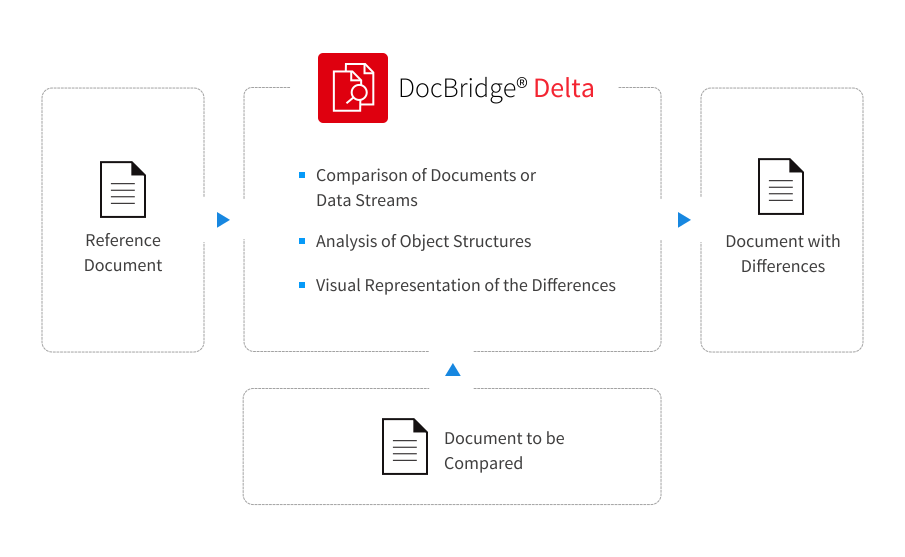
When it comes to files which are not bit-identical, it can be difficult to tell whether they match in terms of content and design. In such cases, the document objects and their characteristics as defined in the file need to be analyzed. If the formats are different, it is also necessary to check that the format features of the same type of objects do not play a role. DocBridge Delta is the solution to this problem, either in the form of visual displays of the differences or by listing the analyzed differences.

The Main Benefits
  • Comparison of documents of the same or different formats - particularly suitable for large production jobs and data streams
  • Visual display of the differences, right down to pixel sizes
  • Detailed list of the differences at an object level
  • Analyzable return codes for automated program processes
  • In the event of different positioning of the entire page content, an adjustment will be suggested for the document being compared
  • Pages of the comparison documents can be individually disabled so that it is possible to make comparisons even if empty pages have been added, for example.
  • Page areas with changing content such as address fields or date information can be removed from the comparison
  • Consistency checks of meta information such as indices in AFP document TLEs
The DocBridge Delta Concept

DocBridge Delta uses the abilities of its underlying basic technology to analyses the objects coded in the document files down to the finest structure detail and convert them to a comprehensive meta-format. As it is able to process all common document formats, it is able to convert completely varied input formats into the shared meta-format object structure. On this level, DocBridge Delta compares both input documents and can display the differences object by object.

Additional Functions

Typical use scenarios

DocBridge Delta is particularly suitable for users working on large production jobs which have converted a provided document into another format with the help of an application and want to check whether the document produced matches the original with regards to its content and display. Within the scope of quality assurance, the result can be important for each task with regards to the basic display and internally used object types or resources.

Visual document comparison

During a visual comparison, both documents are displayed in a grid view of both documents in a pixel image and the converted pixel images are compared with each other - in the same way as with a light table, where both documents can be placed on top of each other to see any differences between them. The pixels which match in both documents are displayed in grey on the generated file, as individual pixels which only appear in one of the two documents are shown in green if they are in the reference document and the corresponding pixels in the comparison document is displayed in red.

In this way, even the smallest of differences between objects, such as borders which differ by only a few pixels in the case of characters which are cut slightly differently.

If it is established that the entire content of the comparison document has shifted, the shift can be compensated for by making an additional setting so that it is possible to check whether there are any other differences between the documents apart from the shift.

If there are individual pages in the comparison documents which do not exist in the compared document, they can be removed during the comparison. For example, additionally produced empty pages can be removed in the comparison.

The document displaying the differences with the comparison points highlighted in color will be provided as a multi-page TIFF document or as a normal PDF.

Structural comparison at an object level

DocBridge Delta makes a detailed record of the recognized differences between the individual objects on each page in a log file. Differences such as those below are listed in the entries:

  • Different positions of objects
  • Differences in terms of content between objects and text differences, different barcode content
  • Different attributes for the same object types, such as different fonts or font attributes and font sizes although the text content is the same

Before the comparison documents are assessed, they are converted to the meta-format based on Unicode so that even if another codepage is used, only real text differences are registered.

Other comparison options

In addition to the comparison between represented objects between two documents, DocBridge Delta also provides analyses of the following types:

  • Binary comparison between two document files
  • Size difference checks with the optional entry of a minimum value in bits or pixels (only size differences from a certain value will be taken into account)
  • Comparison between page numbers and order
  • Comparison on the basis of positioning tolerances (only positioning differences from a specific value will be taken into account)
  • Exclusion of definable page areas for comparison in the case of changing content, e.g. address fields or provided dates
  • Differences in meta information, such as different indices within TLEs in AFP documents or XMP information in PDF documents

All notifications will be returned with a return code and can therefore be assessed by a program if an automatic document comparison is used.

Supported Input and Output Formats

All popular formats are supported. A complete overview is provided in the Compart Matrix.

Supported Platforms

All popular platforms are supported. A complete overview is provided in the DocBridge Delta datasheet.